
oAI Chat App
A command-line interface for chatting with AI models via OpenRouter, supporting model selection, streaming responses, file attachments, credit tracking, and configurable settings.
Features
- Select and switch between OpenRouter models
- Streaming or buffered responses
- Attach images and text files to messages
- View credit usage and balance
- Set persistent default model
- Keyboard shortcuts and history
Installation
Requires Python 3.8+. Download the repository. Install dependencies:
pip install typer rich openrouter pyperclip requests prompt_toolkit
Or use :
pip install -r requiremnets.txt
For convience you can move the application to a folder in you $PATH and rename it to just oai .
Usage
Run the app and interact via commands:
python oai_chat.py
Example session:
Welcome to oAI!
You> /model gpt
(Shows table of GPT models)
Enter model number: 1
Selected: GPT-4o (openai/gpt-4o)

You> Hello, how are you?
Streaming response... (Press Ctrl+C to cancel)
Hello! I'm doing great...
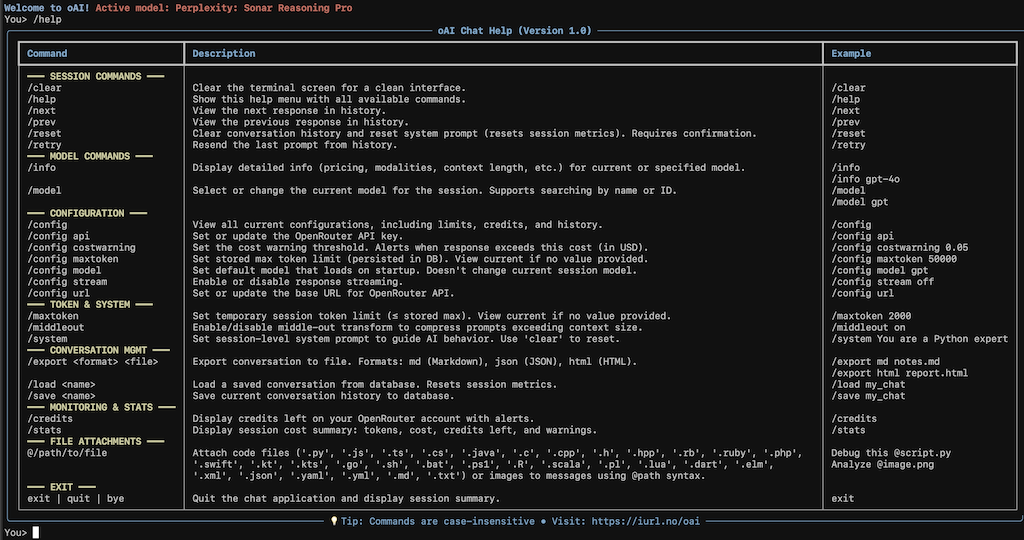
For full commands, use /help in the app.
Screenshot
License
This project is licensed under the MIT License - see the MIT License.
Author: Rune Olsen