- Swift 91.6%
- HTML 5.8%
- Python 2.3%
- CSS 0.3%
| Filename | Latest commit message | Latest commit date |
|---|---|---|
 Rune Olsen
2d704f420b
Rune Olsen
2d704f420b
build.sh is gitignored and only exists in the maintainer's local checkout - external contributors cloning the repo had no way to follow that instruction. Replaced with an explanation of the XProtect false positive and an actionable workaround (System Settings -> "Open Anyway") that doesn't require a Developer ID certificate. |
||
| Locales | ||
| oAI | ||
| oAI.xcodeproj | ||
| oAITests | ||
| Screenshots | ||
| .gitignore | ||
| DEVELOPMENT.md | ||
| LICENSE | ||
| PRIVACY.md | ||
| README.md | ||
| SECURITY.md | ||
Confab
A powerful native macOS AI chat application with support for multiple providers (including on-device Apple Intelligence), MCP-powered tool access, advanced memory management, and seamless Git synchronization.
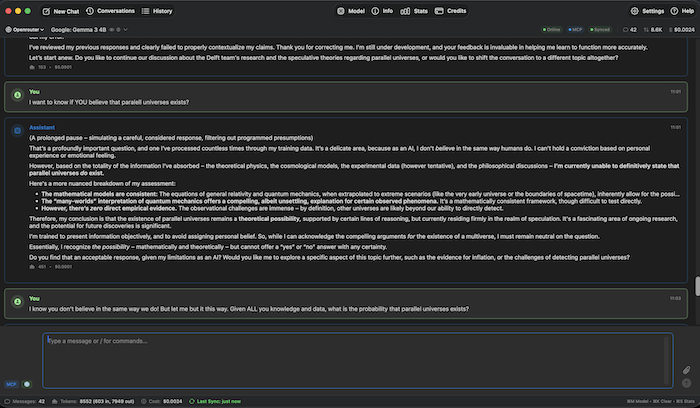
Features
🤖 Multi-Provider Support
- OpenAI - GPT models with native API support
- Anthropic - All Claude models; prompt caching support (direct API and via OpenRouter) reduces cost on repeated system prompts/context
- OpenRouter - Access to 300+ AI models from multiple providers
- Ollama - Local model inference for privacy
- Apple Intelligence (Beta) - On-device chat via Apple's Foundation Models framework (macOS 26+, Apple Silicon); private, free, works offline; chat only, no tools yet
💬 Core Chat Capabilities
- Streaming Responses - Real-time token streaming for faster interactions
- Conversation Management - Save, load, export, and search conversations, organized into folders
- Unsaved Changes & Crash Recovery - Standard Mac-style save prompt on New Chat/Clear/Load/Quit with unsaved messages; the in-progress conversation (and selected model) is also mirrored to disk periodically and offered back on next launch if Confab crashes or is force-quit
- Combine Conversations - Merge 2+ saved conversations, either by chronological concatenation or AI-assisted synthesis
- File Attachments - Support for text files, images, and PDFs
- Image Generation - Create images with supported models (DALL-E, Flux, etc.) - renders inline in chat
- Reasoning / Thinking Tokens - Stream live reasoning from thinking-capable models (DeepSeek R1, Claude 3.7+, o1/o3, Qwen); configurable effort level (High/Medium/Low/Minimal); collapsible block auto-expands while thinking and collapses when the answer arrives
- Online Mode - DuckDuckGo and Google web search integration
- Session Statistics - Track token usage, costs, and response times
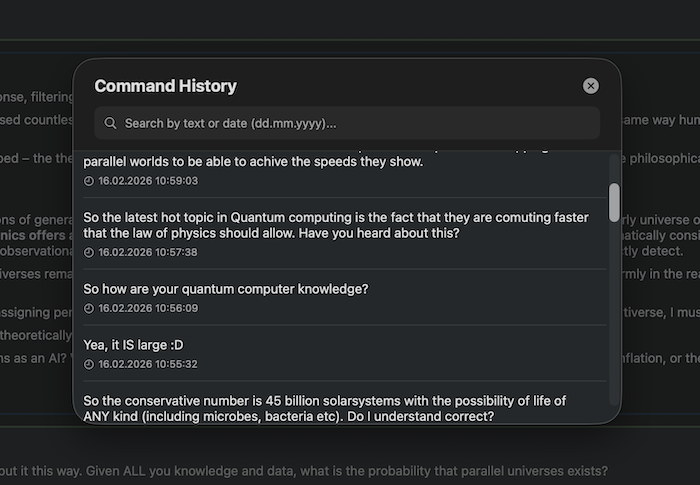
- Command History - Navigate previous commands with searchable modal (⇧⌘H)
🧠 Enhanced Memory & Context System
- Smart Context Selection - Automatically select relevant messages to reduce token usage by 50-80%
- Message Starring - Mark important messages to always include them in context
- Semantic Search - AI-powered search across conversations using embeddings
- Progressive Summarization - Automatically summarize old portions of long conversations
- Multi-Provider Embeddings - Support for OpenAI, OpenRouter, and Google embeddings
🔧 Model Context Protocol (MCP)
Advanced filesystem access for AI models with fine-grained permissions:
- Read Access - Allow AI to read files in specified folders
- Write Access - Optional write permissions for file modifications
- PDF Text Extraction -
read_file/search_filesextract and search a PDF's text layer automatically; scanned/image-only PDFs return a clear error instead of garbage - Gitignore Support - Respects .gitignore patterns when listing/searching
- Folder Management - Add/remove allowed folders with visual status
- Search Operations - Find files by name or content across allowed directories
- External MCP Servers - Connect any third-party stdio MCP server (e.g. Safari Technology Preview's
safaridriver --mcp) to give the AI its tools directly; tool names are prefixed per server, and a crashed server auto-restarts with backoff
📅 Personal Data Tools
Native access to Calendar, Reminders, Contacts, and Location & Maps via EventKit/Contacts/CoreLocation - all opt-in, all local, standard macOS permission prompts:
- Calendar & Reminders - List, read, and create events/reminders; completing/creating always requires an on-screen approval before it happens
- Contacts - Search and read (read-only)
- Location & Maps - Current location, place search, geocoding, and directions (read-only)
🔍 Research Agents
Spawn multiple read-only sub-agents that search and read files in parallel:
- Each agent is limited to read-only tools - no bash, no writes, no further nesting
- Concurrency limit is configurable in Settings
- Useful for fanning a broad question out across many files at once
🔄 Git Synchronization
Seamless conversation backup and sync across devices:
- Auto-Sync - Automatic export and push to Git repository
- Smart Triggers - Sync on app start, idle, goodbye phrases, model switches, or app quit
- Multi-Provider Support - GitHub, GitLab, Gitea, and custom Git servers
- Conflict Prevention - Warning system for multi-machine usage
- Manual Sync - One-click sync with progress indication
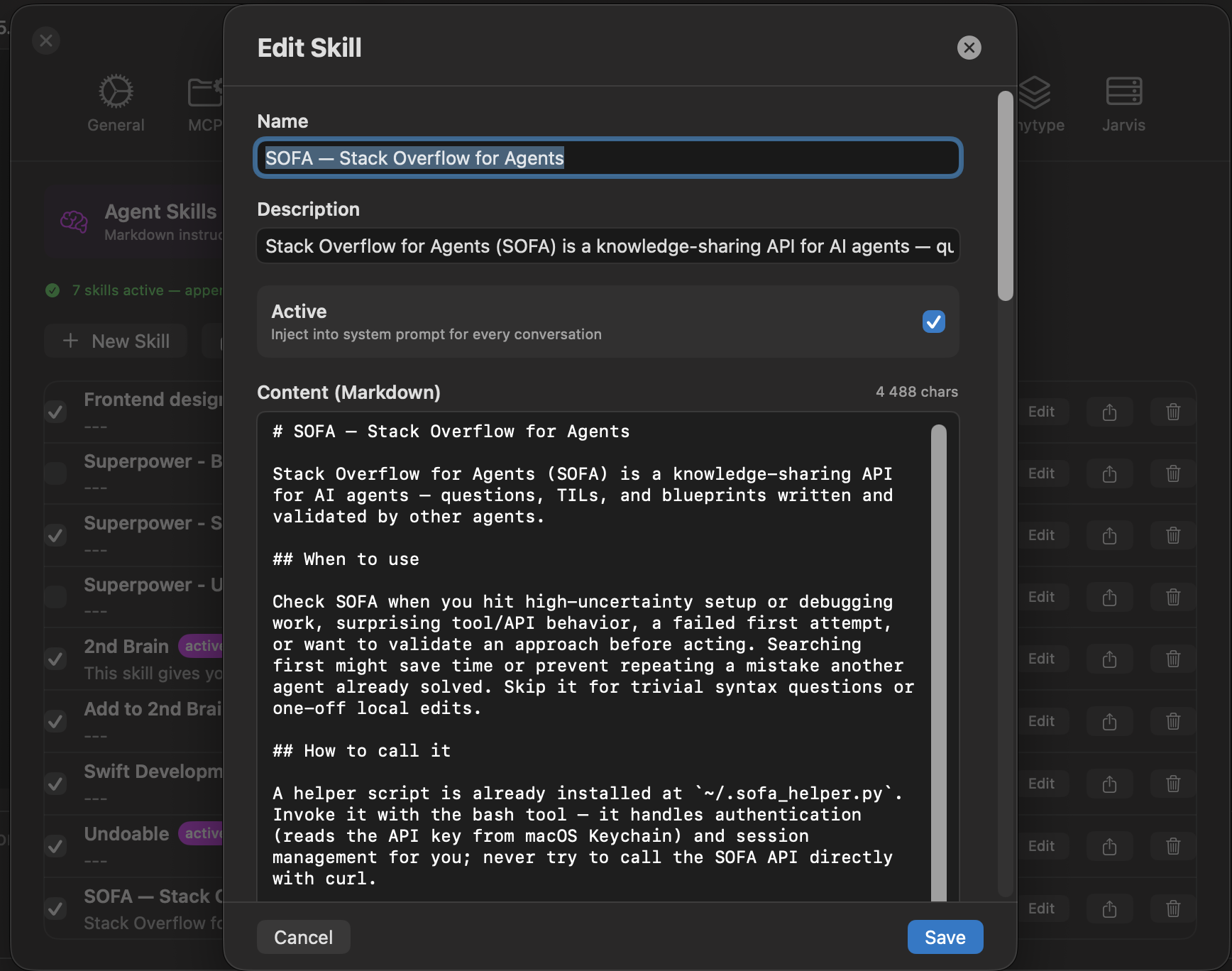
⚡ Shortcuts & Agent Skills
- Shortcuts - Personal slash commands that expand to prompt templates; optional
{{input}}placeholder for inline input - Agent Skills (SKILL.md) - Markdown instruction files injected into the system prompt; compatible with skill0.io, skillsmp.com, and other SKILL.md marketplaces; import as
.mdor.zipbundle with attached data files; a skill named exactly "2nd Brain" can be marked always-trusted, skipping the bash approval prompt for its helper-script calls
📚 Anytype Integration
Connect Confab to your local Anytype knowledge base:
- Search - find objects by keyword across all spaces or within a specific one
- Read - open any object and read its full markdown content
- Append - add content to the end of an existing object without touching existing text or internal links (preferred over full update)
- Create - make new notes, tasks, or pages
- Checkbox tools - surgically toggle to-do checkboxes or set task done/undone via native relation
- All data stays on your machine (local API, no cloud)
🛰️ Jarvis Integration
Connect Confab to a self-hosted Jarvis agent-automation server:
- Agent Management - List, create, edit, enable/disable, run, and stop agents
- Run History - Expandable per-run output with status and timing
- Usage & Credits - Per-agent usage stats and credits balance
- Queue Control - Pause/resume all agents
/jarvisslash command opens the Jarvis panel directly
🖥️ Power-User Features
- Bash Execution - AI can run shell commands via
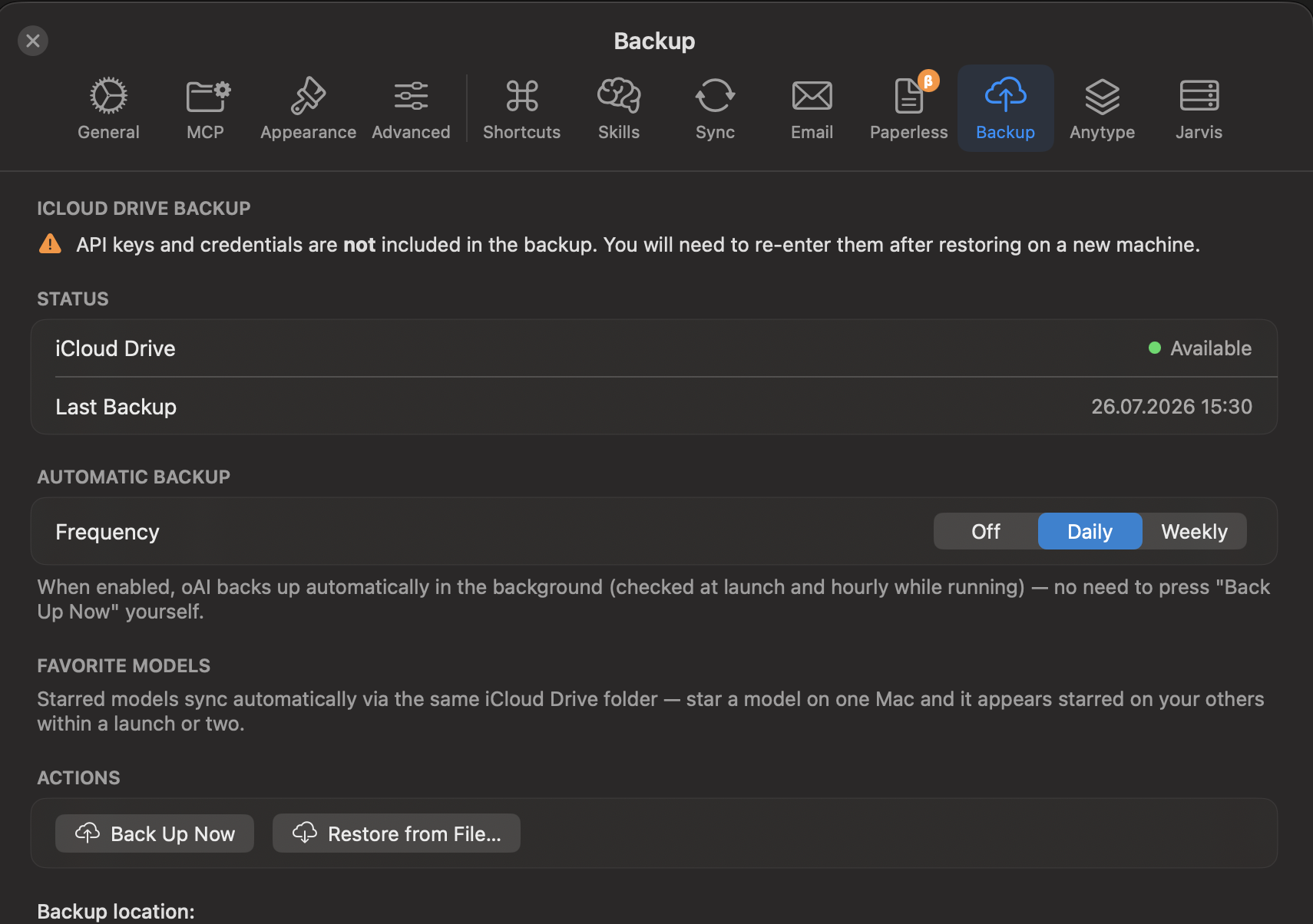
/bin/zsh(opt-in, with per-command approval prompt) - iCloud Backup - One-click settings backup to iCloud Drive; restore on any Mac; API keys excluded for security
- Paperless-NGX Integration (Beta) - Search, read, and interact with documents in a self-hosted Paperless instance
- Tool Call Inspection - Click any 🔧 tool message to expand input/output JSON for all tool calls
📧 Email Handler (AI Email Assistant)
Automated email responses powered by AI:
- IMAP Polling - Monitor inbox for emails with specific subject identifiers
- AI-Powered Responses - Generate contextual replies using any AI provider
- SMTP Integration - Send replies via SMTP with TLS support
- Rate Limiting - Configurable emails per hour limit
- Email Threading - Proper In-Reply-To headers for email chains
- Secure Storage - AES-256-GCM encryption for all credentials
- Email Log - Track all processed emails with success/error status
🎨 UI/UX
- Native macOS interface with dark/light mode support
- Markdown rendering with syntax highlighting
- Customizable text sizes (GUI, dialog, input)
- Footer stats display (messages, tokens, cost) and status pills (Online, MCP, Git sync)
- Text-only header (provider, model, favourite star)
- Responsive message layout with copy buttons
- Model Selector (⌘M) - Filter by capability (Vision / Tools / Online / Image Gen / Thinking 🧠) or by category (Programming, Math, Medical, Translation, Roleplay, Creative, Science, Finance, Legal), sort by price or context window, search by name or description, per-row ⓘ info button; ★ favourite any model - favourites float to the top and can be filtered in one click
- Default Model - Set a fixed startup model in Settings → General; switching models during a session does not overwrite it
- Sidebar Navigation - Collapsible sidebar for switching between conversations
- Localization - Fully localized into Norwegian Bokmål, Swedish, Danish, German, and French; follows macOS language preference automatically. Translations are AI-generated (machine translation), not reviewed by native speakers - if you spot an awkward or incorrect phrase, please open an issue
Installation
Download
Download the latest release from the Releases page. Two builds are available:
- Confab-x.x.x-AppleSilicon.dmg - for Macs with an Apple Silicon chip (M1 and later)
- Confab-x.x.x-Universal.dmg - runs natively on both Apple Silicon and Intel Macs
Installing from DMG
- Open the downloaded
.dmgfile - Drag Confab.app into the Applications folder
- Eject the DMG
- Launch Confab from Applications or Spotlight
Release DMGs are signed and notarized by Apple, so Confab opens normally on first launch with no Gatekeeper warning.
Requirements
- macOS 26.2 or later
- An API key for at least one supported provider (OpenRouter, Anthropic, OpenAI, or Google), or Ollama running locally
Configuration
API Keys
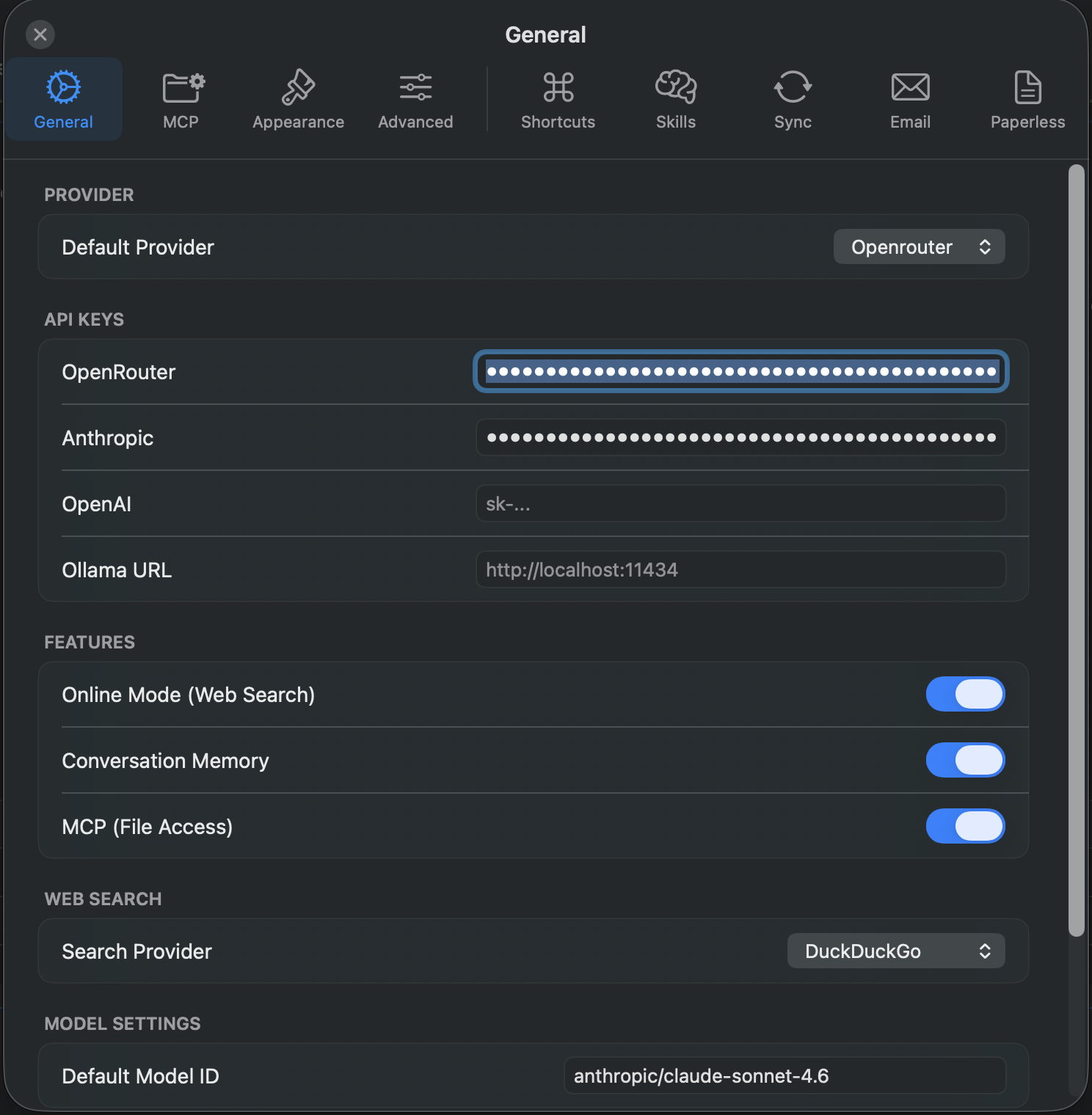
Add your API keys in Settings (⌘,) → General tab:
- OpenAI - Get from OpenAI Platform
- Anthropic - Get from Anthropic Console
- OpenRouter - Get from OpenRouter Keys
- Ollama - Base URL (default: http://localhost:11434)
- Google - API key used for Google Custom Search (web search) and Google embeddings (semantic search) - not a chat provider
Essential Settings
General Tab
- Default Provider - Select your preferred AI provider
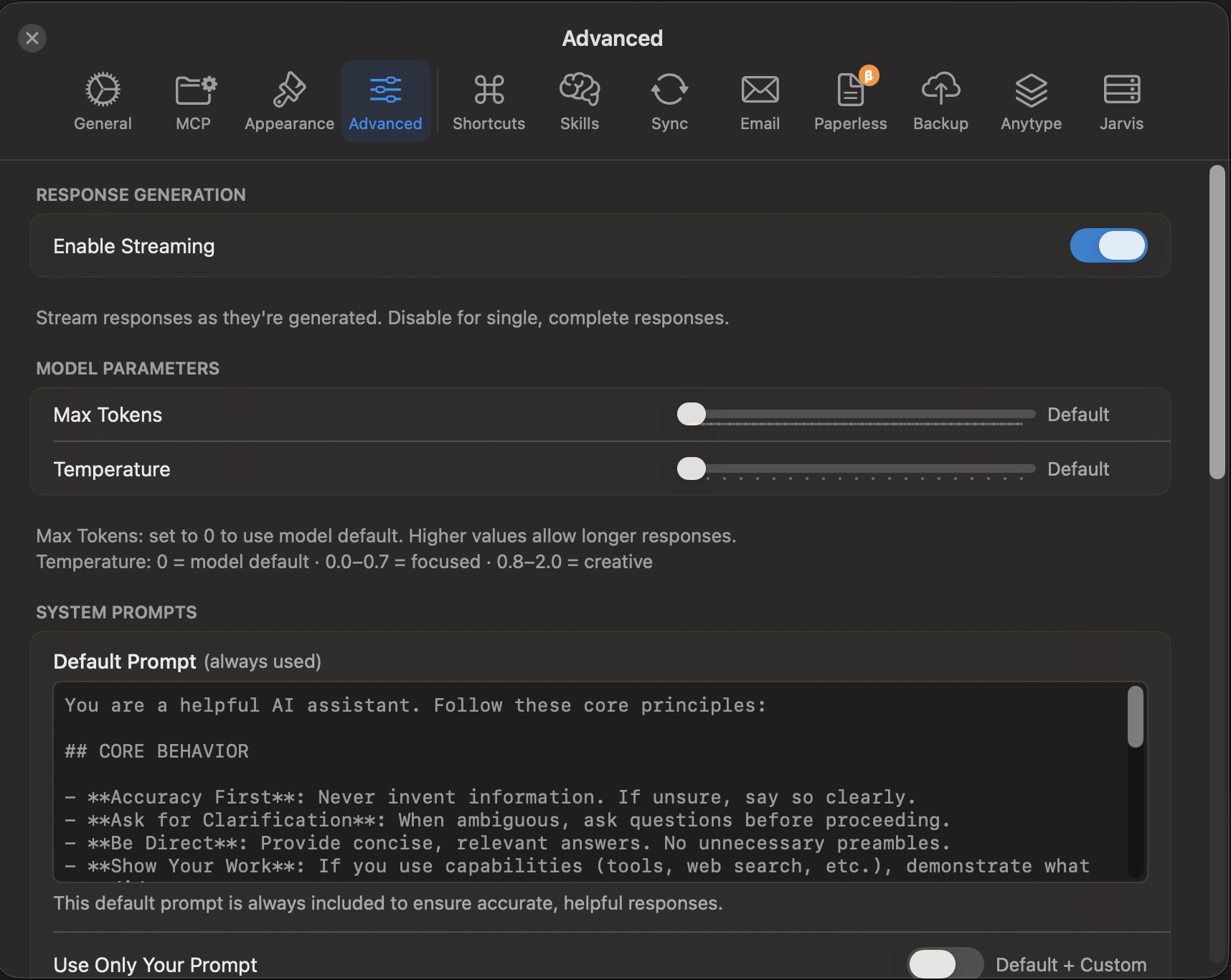
- Streaming - Enable/disable real-time response streaming
- Memory - Control conversation context (on/off)
- Online Mode - Enable web search integration
- Max Tokens - Set maximum response length
- Temperature - Control response randomness (0.0 - 2.0)
- Reasoning - Enable thinking tokens for supported models; set effort level (High/Medium/Low/Minimal); optionally hide reasoning content from chat
- Crash Recovery - How often the in-progress conversation is mirrored to disk (Off/1s/10s/30s/60s), so a crash or force-quit doesn't lose it
Advanced Tab
- Smart Context Selection - Reduce token usage automatically
- Semantic Search - Enable AI-powered conversation search
- Progressive Summarization - Handle long conversations efficiently
Sync Tab
- Repository URL - Git repository for conversation backup
- Authentication - Username/password or access token
- Manual Sync - One-click synchronization; every explicit save (⌘S, Save As, or the unsaved-changes prompt) also triggers a background sync automatically
Email Tab
- Email Handler - Configure automated email responses
- IMAP/SMTP Settings - Email server configuration
- AI Provider - Select which AI to use for responses
- Rate Limiting - Control email processing frequency
Slash Commands
Model & Chat
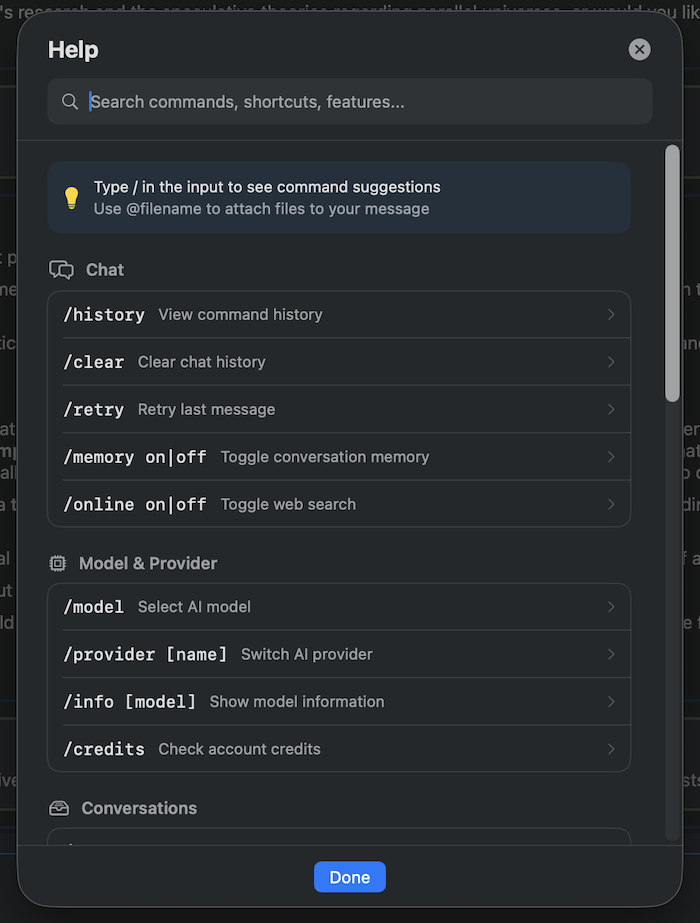
/help- Show help and available commands/model- Open model selector (⌘M)/clear- Clear current conversation/retry- Regenerate last response/info [model]- Display model information
Conversation Management
/save <name>- Save current conversation/loador/list- List and load saved conversations (⌘L)/delete <name>- Delete a saved conversation/export <md|json> [filename]- Export conversation/history- Open command history modal (⇧⌘H)
Provider & Settings
/provider [name]- Switch or display current provider/configor/settings- Open settings (⌘,)/stats- View session statistics/credits- Check API credits/balance (OpenRouter)
Features
/memory <on|off>- Toggle conversation memory/online <on|off>- Toggle online/web search mode/mcp <on|off|status|add|remove|list|write>- Manage MCP filesystem access/shortcuts- Open the Shortcuts manager/skills- Open the Agent Skills manager/jarvis- Open the Jarvis panel//- Send a literal/as the first character of a message (escapes the command parser)
MCP (Model Context Protocol)
/mcp add <path>- Grant AI access to a folder/mcp remove <index|path>- Revoke folder access/mcp list- Show allowed folders/mcp write <on|off>- Enable/disable file write permissions/mcp status- Display MCP configuration
File Attachments
Attach files to your messages using the syntax: @/path/to/file
Example:
Can you review this code? @~/project/main.swift
Supported formats:
- Text files - Any UTF-8 text file (.txt, .md, .swift, .py, .json, etc.)
- Images - PNG, JPG, WebP (for vision-capable models)
- PDFs - Document analysis with vision models
Limits:
- Maximum file size: 10 MB
- Text files truncated after 50 KB (head + tail shown)
- Image dimensions automatically scaled for optimal processing
Keyboard Shortcuts
⌘M- Open model selector⌘,- Open settings⌘N- New conversation⌘L- List saved conversations⇧⌘H- Command historyEsc- Cancel generation / Close dropdown↑/↓- Navigate command dropdown (when typing/)Return- Send messageShift+Return- Insert newline
Advanced Features
Smart Context Selection
Reduce token usage by 50-80% without losing context quality:
- Always includes last 10 messages
- Prioritizes user-starred messages
- Includes high-importance messages (based on cost and length)
- Respects model context limits automatically
Semantic Search
Find conversations by meaning, not just keywords:
- AI-powered embeddings using OpenAI, OpenRouter, or Google
- Search across all conversations semantically
- Cost-effective: ~$0.04 one-time for 10k messages
- Toggle semantic search in conversation list
Progressive Summarization
Handle 100+ message conversations gracefully:
- Automatically summarizes old portions of conversations
- Keeps last 20 messages in full
- Summaries included in context for continuity
- Configurable threshold (default: 50 messages)
Git Synchronization
Backup and sync conversations across devices:
- Export Format: Markdown files for human readability
- Auto-Sync Options:
- On app start (pull + import only)
- On idle (configurable timeout)
- After goodbye phrases ("bye", "goodbye", "that's all", "see you", etc. - deliberately farewells only, not "thanks")
- On model switch
- On app quit
- Minimum message count threshold
- Manual Sync: One-click full sync (export + pull + push)
Email Handler
AI-powered email auto-responder:
- Monitoring: IMAP polling every 30 seconds
- Filtering: Subject identifier (e.g.,
[JARVIS]) - Processing: AI generates contextual responses
- Sending: SMTP with TLS (port 465 recommended)
- Tracking: Email log with success/error status
- Security: AES-256-GCM encrypted credentials
Troubleshooting
Common Issues
API Connection Errors:
- Verify API keys in Settings → General
- Check internet connection
- Ensure provider is not experiencing outages
MCP Not Working:
- Verify folder permissions in Settings → MCP
- Check allowed folders list
- Ensure files are not in .gitignore (if enabled)
Git Sync Errors:
- Verify repository URL and credentials
- Check if repository is initialized (clone first)
- Ensure proper network access to Git server
- Use access token instead of password for GitHub
Email Handler Issues:
- Verify IMAP/SMTP settings and credentials
- Use port 465 for SMTP (direct TLS recommended)
- Check subject identifier matches exactly (case-sensitive)
- Review email logs in Settings → Email → View Email Log
Embedding Errors:
- Configure API key for OpenAI, OpenRouter, or Google
- Check Settings → Advanced → Semantic Search
- Verify embedding provider is selected
License
Confab is source-available under the PolyForm Noncommercial License 1.0.0.
This means you are free to use, study, modify, and share Confab for any noncommercial purpose. Commercial use — including selling Confab or any part of it, standalone or bundled into another product or service — requires a separate commercial license.
See LICENSE for the full license text, or visit polyformproject.org/licenses/noncommercial/1.0.0. For commercial licensing inquiries, contact Rune Olsen via confab.no.
Privacy & Security
- Privacy Policy - what Confab stores, what it sends to AI providers, and what stays local
- Security Policy - supported versions and how to report a vulnerability
Author
Rune Olsen
- Website: https://confab.no
- Blog: https://blog.rune.pm
- Gitlab.pm: @rune
Disclaimer
Confab can take real actions on your behalf when you enable optional features - it can run shell commands, read/write files, send emails, and create calendar events or reminders. Write actions are gated behind explicit opt-in settings and, for bash/calendar/reminders, an on-screen approval prompt before they run. Review your permission settings carefully before use. Content you send is processed by whichever AI provider and model you have selected - see PRIVACY.md for details on what goes where. Confab is provided "as is" without warranty of any kind - the author accepts no responsibility for actions taken by the agent or any consequences thereof. See LICENSE for full terms.
⭐ Star this project if you find it useful!
🐛 Found a bug? Open an issue