
oAI - OpenRouter AI Chat
A powerful terminal-based chat interface for OpenRouter API with MCP (Model Context Protocol) support, enabling AI agents to access local files and query SQLite databases directly.
Description
oAI is a feature-rich command-line chat application that provides an interactive interface to OpenRouter's AI models. It now includes MCP integration for local file system access and read-only database querying, allowing AI to help with code analysis, data exploration, and more.
Features
Core Features
- 🤖 Interactive chat with 300+ AI models via OpenRouter
- 🔍 Model selection with search and capability filtering
- 💾 Conversation save/load/export (Markdown, JSON, HTML)
- 📎 File attachment support (images, PDFs, code files)
- 💰 Session cost tracking and credit monitoring
- 🎨 Rich terminal formatting with syntax highlighting
- 📝 Persistent command history with search (Ctrl+R)
- ⚙️ Configurable system prompts and token limits
- 🗄️ SQLite-based configuration and conversation storage
- 🌐 Online mode (web search capabilities)
- 🧠 Conversation memory toggle (save costs with stateless mode)
NEW: MCP (Model Context Protocol) v2.1.0-beta
-
🔧 File Mode: AI can read, search, and list your local files
- Automatic .gitignore filtering
- Virtual environment exclusion (venv, node_modules, etc.)
- Supports code files, text, JSON, YAML, and more
- Large file handling (auto-truncates >50KB)
-
🗄️ Database Mode: AI can query your SQLite databases
- Read-only access (no data modification possible)
- Schema inspection (tables, columns, indexes)
- Full-text search across all tables
- SQL query execution (SELECT, JOINs, CTEs, subqueries)
- Query validation and timeout protection
- Result limiting (max 1000 rows)
-
🔒 Security Features:
- Explicit folder/database approval required
- System directory blocking
- Read-only database access
- SQL injection protection
- Query timeout (5 seconds)
Requirements
- Python 3.10-3.13 (3.14 not supported yet)
- OpenRouter API key (get one at https://openrouter.ai)
- Function-calling model required for MCP features (GPT-4, Claude, etc.)
Screenshot
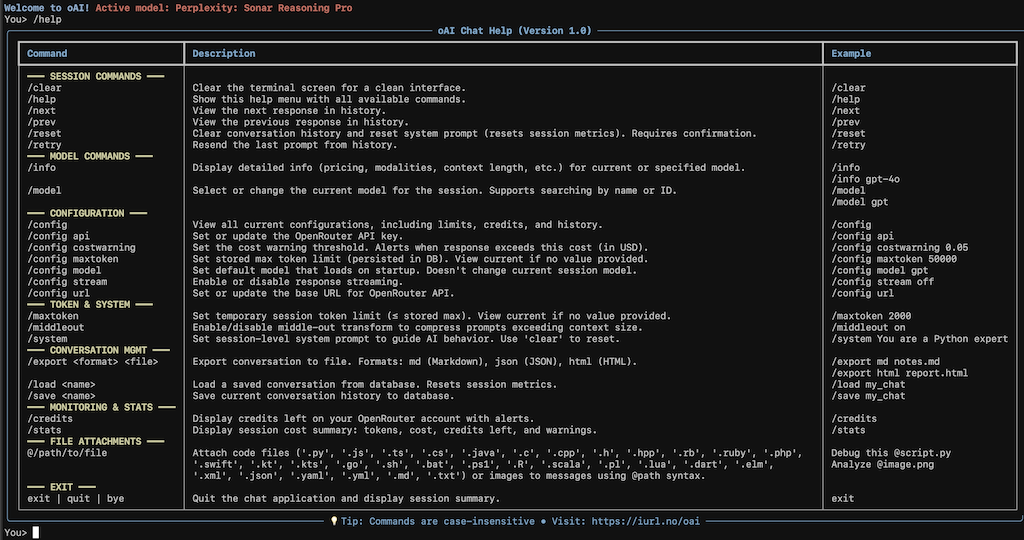
Screenshot from version 1.0 - MCP interface shows mode indicators like [🔧 MCP: Files] or [🗄️ MCP: DB #1]
Installation
Option 1: From Source (Recommended for Development)
1. Install Dependencies
pip install -r requirements.txt
2. Make Executable
chmod +x oai.py
3. Copy to PATH
# Option 1: System-wide (requires sudo)
sudo cp oai.py /usr/local/bin/oai

# Option 2: User-local (recommended)
mkdir -p ~/.local/bin
cp oai.py ~/.local/bin/oai

# Add to PATH if needed (add to ~/.bashrc or ~/.zshrc)
export PATH="$HOME/.local/bin:$PATH"
4. Verify Installation
oai --version
Option 2: Pre-built Binaries
Download platform-specific binaries:
- macOS (Apple Silicon):
oai_vx.x.x_mac_arm64.zip - Linux (x86_64):
oai_vx.x.x-linux-x86_64.zip
# Extract and install
unzip oai_vx.x.x_mac_arm64.zip  # or `oai_vx.x.x-linux-x86_64.zip`
chmod +x oai
mkdir -p ~/.local/bin
mv oai ~/.local/bin/
Option 3: Build Your Own Binary
# Install build dependencies
pip install -r requirements.txt
pip install nuitka ordered-set zstandard

# Run build script
chmod +x build.sh
./build.sh

# Binary will be in dist/oai
cp dist/oai ~/.local/bin/
Alternative: Shell Alias
# Add to ~/.bashrc or ~/.zshrc
alias oai='python3 /path/to/oai.py'
Quick Start
First Run Setup
oai
On first run, you'll be prompted to enter your OpenRouter API key.
Basic Usage
# Start chatting
oai

# Select a model
You> /model

# Enable MCP for file access
You> /mcp enable
You> /mcp add ~/Documents

# Ask AI to help with files
[🔧 MCP: Files] You> List all Python files in Documents
[🔧 MCP: Files] You> Read and explain main.py

# Switch to database mode
You> /mcp add db ~/myapp/data.db
You> /mcp db 1
[🗄️ MCP: DB #1] You> Show me all tables
[🗄️ MCP: DB #1] You> Find all users created this month
MCP Guide
File Mode (Default)
Setup:
/mcp enable                    # Start MCP server
/mcp add ~/Projects            # Grant access to folder
/mcp add ~/Documents           # Add another folder
/mcp list                      # View all allowed folders
Natural Language Usage:
"List all Python files in Projects"
"Read and explain config.yaml"
"Search for files containing 'TODO'"
"What's in my Documents folder?"
Available Tools:
read_file- Read complete file contentslist_directory- List files/folders (recursive optional)search_files- Search by name or content
Features:
- ✅ Automatic .gitignore filtering
- ✅ Skips virtual environments (venv, node_modules)
- ✅ Handles large files (auto-truncates >50KB)
- ✅ Cross-platform (macOS, Linux, Windows via WSL)
Database Mode
Setup:
/mcp add db ~/app/database.db  # Add SQLite database
/mcp db list                   # View all databases
/mcp db 1                      # Switch to database #1
Natural Language Usage:
"Show me all tables in this database"
"Find records mentioning 'error'"
"How many users registered last week?"
"Get the schema for the orders table"
"Show me the 10 most recent transactions"
Available Tools:
inspect_database- View schema, tables, columns, indexessearch_database- Full-text search across tablesquery_database- Execute read-only SQL queries
Supported Queries:
- ✅ SELECT statements
- ✅ JOINs (INNER, LEFT, RIGHT, FULL)
- ✅ Subqueries
- ✅ CTEs (Common Table Expressions)
- ✅ Aggregations (COUNT, SUM, AVG, etc.)
- ✅ WHERE, GROUP BY, HAVING, ORDER BY, LIMIT
- ❌ INSERT/UPDATE/DELETE (blocked for safety)
Mode Management
/mcp status        # Show current mode, stats, folders/databases
/mcp files         # Switch to file mode
/mcp db <number>   # Switch to database mode
/mcp gitignore on  # Enable .gitignore filtering (default)
/mcp remove 2      # Remove folder/database by number
Command Reference
Session Commands
/help [command]    Show help menu or detailed command help
/help mcp          Comprehensive MCP guide
/clear or /cl      Clear terminal screen (or Ctrl+L)
/memory on|off     Toggle conversation memory (save costs)
/online on|off     Enable/disable web search
/paste [prompt]    Paste clipboard content
/retry             Resend last prompt
/reset             Clear history and system prompt
/prev              View previous response
/next              View next response
MCP Commands
/mcp enable        Start MCP server
/mcp disable       Stop MCP server
/mcp status        Show comprehensive status
/mcp add <folder>  Add folder for file access
/mcp add db <path> Add SQLite database
/mcp list          List all folders
/mcp db list       List all databases
/mcp db <number>   Switch to database mode
/mcp files         Switch to file mode
/mcp remove <num>  Remove folder/database
/mcp gitignore on  Enable .gitignore filtering
Model Commands
/model [search]    Select/change AI model
/info [model_id]   Show model details (pricing, capabilities)
Configuration
/config            	View all settings
/config api        	Set API key
/config model      	Set default model
/config online     	Set default online mode (on|off)
/config stream     	Enable/disable streaming (on|off)
/config maxtoken   	Set max token limit
/config costwarning Set cost warning threshold ($)
/config loglevel   	Set log level (debug/info/warning/error)
/config log        	Set log file size (MB)
Conversation Management
/save <name>       		Save conversation
/load <name|num>   		Load saved conversation
/delete <name|num> 		Delete conversation
/list              		List saved conversations
/export md|json|html 	<file> Export conversation
Token & System
/maxtoken [value]  Set session token limit
/system [prompt]   Set system prompt (use 'clear' to reset)
/middleout on|off  Enable prompt compression
Monitoring
/stats             View session statistics
/credits           Check OpenRouter credits
File Attachments
@/path/to/file     Attach file (images, PDFs, code)

Examples:
  Debug @script.py
  Analyze @data.json
  Review @screenshot.png
Configuration Options
All configuration stored in ~/.config/oai/:
Files
oai_config.db- SQLite database (settings, conversations, MCP config)oai.log- Application logs (rotating, configurable size)history.txt- Command history (searchable with Ctrl+R)
Key Settings
- API Key: OpenRouter authentication
- Default Model: Auto-select on startup
- Streaming: Real-time response display
- Max Tokens: Global and session limits
- Cost Warning: Alert threshold for expensive requests
- Online Mode: Default web search setting
- Log Level: debug/info/warning/error/critical
- Log Size: Rotating file size in MB
Supported File Types
Code Files
.py, .js, .ts, .cs, .java, .c, .cpp, .h, .hpp, .rb, .ruby, .php, .swift, .kt, .kts, .go, .sh, .bat, .ps1, .R, .scala, .pl, .lua, .dart, .elm
Data Files
.json, .yaml, .yml, .xml, .csv, .txt, .md
Images
All standard formats: PNG, JPEG, JPG, GIF, WEBP, BMP
Documents
PDF (models with document support)
Size Limits
- Images: 10 MB max
- Code/Text: Auto-truncates files >50KB
- Binary data: Displayed as
<binary: X bytes>
MCP Security
Access Control
- ✅ Explicit folder/database approval required
- ✅ System directories blocked automatically
- ✅ User confirmation for each addition
- ✅ .gitignore patterns respected (file mode)
Database Safety
- ✅ Read-only mode (cannot modify data)
- ✅ SQL query validation (blocks INSERT/UPDATE/DELETE)
- ✅ Query timeout (5 seconds max)
- ✅ Result limits (1000 rows max)
- ✅ Database opened in
mode=ro
File System Safety
- ✅ Read-only access (no write/delete)
- ✅ Virtual environment exclusion
- ✅ Build artifact filtering
- ✅ Maximum file size (10 MB)
Tips & Tricks
Command History
- ↑/↓ arrows: Navigate previous commands
- Ctrl+R: Search command history
- Auto-complete: Start typing
/for command suggestions
Cost Optimization
/memory off        # Disable context (stateless mode)
/maxtoken 1000     # Limit response length
/config costwarning 0.01  # Set alert threshold
MCP Best Practices
# Check status frequently
/mcp status

# Use specific paths to reduce search time
"List Python files in Projects/app/"  # Better than
"List all Python files"                # Slower

# Database queries - be specific
"SELECT * FROM users LIMIT 10"  # Good
"SELECT * FROM users"           # May hit row limit
Debugging
# Enable debug logging
/config loglevel debug

# Check log file
tail -f ~/.config/oai/oai.log

# View MCP statistics
/mcp status  # Shows tool call counts
Troubleshooting
MCP Not Working
# 1. Check if MCP is installed
python3 -c "import mcp; print('MCP OK')"

# 2. Verify model supports function calling
/info  # Look for "tools" in supported parameters

# 3. Check MCP status
/mcp status

# 4. Review logs
tail ~/.config/oai/oai.log
Import Errors
# Reinstall dependencies
pip install --force-reinstall -r requirements.txt
Binary Issues (macOS)
# Remove quarantine
xattr -cr ~/.local/bin/oai

# Check security settings
# System Settings > Privacy & Security > "Allow Anyway"
Database Errors
# Verify it's a valid SQLite database
sqlite3 database.db ".tables"

# Check file permissions
ls -la database.db
Version History
v2.1.0-beta (Current)
- ✨ NEW: MCP (Model Context Protocol) integration
- ✨ NEW: File system access (read, search, list)
- ✨ NEW: SQLite database querying (read-only)
- ✨ NEW: Dual mode support (Files & Database)
- ✨ NEW: .gitignore filtering
- ✨ NEW: Binary data handling in databases
- ✨ NEW: Mode indicators in prompt
- ✨ NEW: Comprehensive
/help mcpguide - 🔧 Improved error handling for tool calls
- 🔧 Enhanced logging for MCP operations
- 🔧 Statistics tracking for tool usage
v1.9.6
- Base version with core chat functionality
- Conversation management
- File attachments
- Cost tracking
- Export capabilities
License
MIT License
Copyright (c) 2024-2025 Rune Olsen
Permission is hereby granted, free of charge, to any person obtaining a copy of this software and associated documentation files (the "Software"), to deal in the Software without restriction, including without limitation the rights to use, copy, modify, merge, publish, distribute, sublicense, and/or sell copies of the Software, and to permit persons to whom the Software is furnished to do so, subject to the following conditions:
The above copyright notice and this permission notice shall be included in all copies or substantial portions of the Software.
THE SOFTWARE IS PROVIDED "AS IS", WITHOUT WARRANTY OF ANY KIND, EXPRESS OR IMPLIED, INCLUDING BUT NOT LIMITED TO THE WARRANTIES OF MERCHANTABILITY, FITNESS FOR A PARTICULAR PURPOSE AND NONINFRINGEMENT. IN NO EVENT SHALL THE AUTHORS OR COPYRIGHT HOLDERS BE LIABLE FOR ANY CLAIM, DAMAGES OR OTHER LIABILITY, WHETHER IN AN ACTION OF CONTRACT, TORT OR OTHERWISE, ARISING FROM, OUT OF OR IN CONNECTION WITH THE SOFTWARE OR THE USE OR OTHER DEALINGS IN THE SOFTWARE.
Full license: https://opensource.org/licenses/MIT
Author
Rune Olsen
- Blog: https://blog.rune.pm
- Project: https://iurl.no/oai
Contributing
Contributions welcome! Please:
- Fork the repository
- Create a feature branch
- Submit a pull request with detailed description
Acknowledgments
- OpenRouter team for the unified AI API
- Rich library for beautiful terminal output
- MCP community for the protocol specification
Star ⭐ this project if you find it useful!