
12 KiB
oAI Chat App
A command-line interface (CLI) chat application for interacting with AI language models via OpenRouter. Seamlessly switch between 300+ models, attach files (images and text), enjoy real-time streaming responses, and manage settings persistently—all from your terminal. Perfect for developers, writers, and AI enthusiasts looking for a fast, feature-rich chat experience without leaving the command line.

🌟 Features
- Model Flexibility: Choose from hundreds of OpenRouter-supported models (e.g., GPT-4, Claude, Gemini) with substring-based search and selection—inspired by dynamic model retrieval in advanced CLIs github.com for seamless user experience.
- File Attachments: Attach images (JPEG, PNG) or plain text files directly to messages using
@pathsyntax, with automatic Base64 encoding for models that support modalities github.com, enhancing multimodal interactions like in OrChat's smart picker. - Streaming Responses: Enable real-time streaming for faster, live responses; toggle on/off via config commands (inspired by streaming in modern chat apps), with Ctrl+C cancellation support similar to advanced TUIs.
- Persistent Configuration: Securely store API keys, base URLs, and settings in a local SQLite database for reuse across sessions, leveraging cross-session persistence like in OrChat's conversation management github.com.
- Rich UI in CLI: Enhanced console output with Rich library panels, tables, and progress indicators for a polished terminal experience, drawing from Ink-based interfaces in React TUIs github.com.
- Arrow Key History Navigation: Scroll through previous user inputs using up/down arrow keys for quick recall and editing, akin to command history in shells and CLIs like those using prompt_toolkit prompt-toolkit.readthedocs.io, for efficient iterative chatting.
- Screen Clearing: Instantly clear the terminal screen with the
/clearcommand, maintaining session state while providing a fresh interface—similar to/clsor/clear-screenin advanced chat apps github.com, preventing visual clutter. - Clipboard Integration: Copy AI responses to the clipboard with a single prompt.
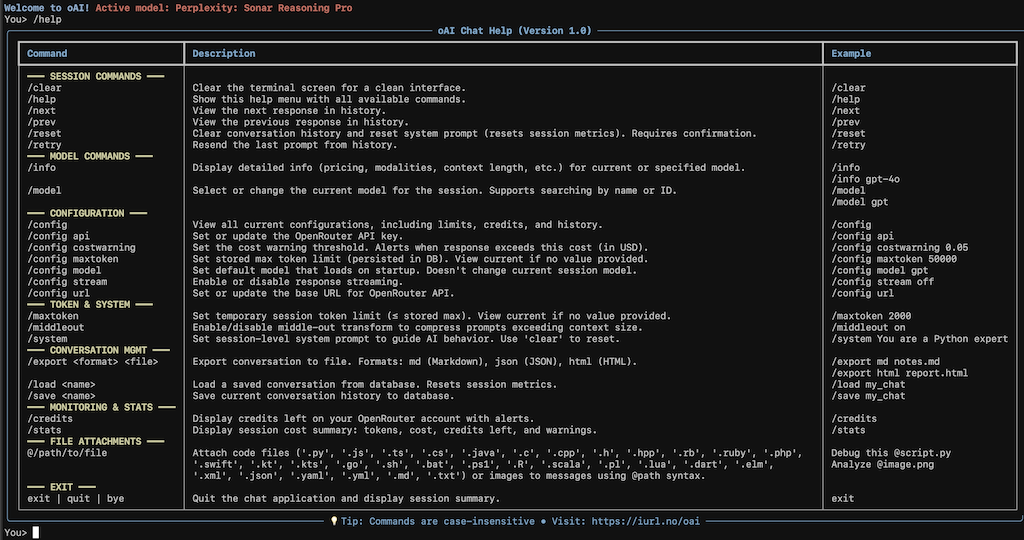
- Help Command: Built-in
/helpwith examples for all commands, making the app self-documenting and user-friendly github.com. - Error Handling: Graceful prompts for missing configs, file issues, and model incompatibilities.
- Cross-Platform: Works on any OS with Python and internet access, no heavy dependencies required.
🖼️ Screenshots
📋 Requirements
- Python: 3.9 or higher
- OpenRouter API Key: Free tier available at openrouter.ai. Models like GPT-4 may require a paid plan.
- Additional Dependencies: Requires
prompt_toolkitfor interactive input features like arrow key history and multi-line support (install viapip install prompt_toolkit) prompt-toolkit.readthedocs.io. - Base Dependencies: Listed in
requirements.txt(generate automatically with tools likepipreqsif needed). - Internet Connection: For API calls to OpenRouter.
🚀 Installation
-
Clone the Repository:
git clone https://github.com/yourusername/oai-chat-app.git # Replace with your actual repo URL cd oai-chat-app -
Install Dependencies: Use
pipfor simplicity oruvfor faster management:# Using pip pip install typer rich openrouter pyperclip requests prompt_toolkit # Using uv uv add typer rich openrouter pyperclip requests prompt_toolkit # Using pip and requirements.txt (recommended) pip3 install -r requirements.txt -
Set Up Configuration:
- The app creates a SQLite database at
~/.config/oai/oai_config.dbon first run. - Run the app once to set your API key:
python oai_chat.py chat. - For API key issues, visit openrouter.ai/settings/keys.
- The app creates a SQLite database at
-
Make Executable (Optional):
chmod +x oai_chat.py # For Unix-based systems
Your app is now ready! Run python oai_chat.py chat to start chatting github.com inspired by simple setup in AI tools.
💻 Usage
Launch the app and interact via commands or direct chat:
python oai_chat.py chat
Available Commands
| Command | Description | Example |
|---|---|---|
/help |
Display a table with examples for all commands and features, including new ones like /clear. |
/help |
/model [search] |
Select or switch models; optional search for substring matching. | /model gpt (Filters to GPT models)/model (Shows all models) |
/config api |
Update OpenRouter API key and reinitialize the client. | /config apiEnter key: sk-... [Output: API key updated!] |
/config url |
Change the base URL for custom OpenRouter endpoints. | /config urlEnter URL: https://custom.openrouter.ai/api/v1 |
| /config model | "Set a default model that loads on startup; displays models for selection (persisted in DB, doesn't change current session model)." | /config model gpt(Shows GPT models; user selects to set as default) |
/config stream on/off |
Toggle response streaming (default: on for real-time chat). | /config stream off (For full responses at once)/config stream on |
/config |
View current configurations. | /config (Displays table: API Key, Base URL, Streaming, Database path) |
/clear |
Clear the terminal screen for a clean interface, preserving chat state. | /clear[Output: Screen cleared. Ready for your next input!] |
exit, quit, bye |
Exit the app cleanly. | exit |
| Chatting with Files | Attach files using @path (e.g., images for vision models, text for context). |
Explain this @~/demo.png(Attaches image if model supports it) |
| Arrow Key Navigation | Use ↑/↓ arrow keys to scroll through and edit previous user inputs. | While at "You>" prompt, press ↑ for last message, ↓ for next. |
Example Session
Welcome to oAI! Type your message, '/model [search]' to select/change model, '/config api/url/stream' to configure, '/help' for examples, or 'exit'/'quit' to end.
No model selected. Use '/model' to choose one.

You> /help
[Displays help table as above]

You> /model gpt
(Shows table of GPT models)
Enter model number: 1
Selected: GPT-4o (openai/gpt-4o)

You> Hello, how are you?
Streaming response... (Press Ctrl+C to cancel)
Hello! I'm doing great, thanks for asking. How can I help you today?

Type 'c' to copy response to clipboard, or press Enter to continue: c
Response copied to clipboard!

You> /clear
Screen cleared. Ready for your next input!

You> Analyze this text @~/notes.txt
Streaming response... (Press Ctrl+C to cancel)
Based on the attached file, the text discusses...

You> [↑ arrow key pressed - recalls previous message: Analyze this text @~/notes.txt]
[Edit as needed and press Enter]

You> exit
Goodbye!
- Streaming: Enabled by default for live responses; press Ctrl+C mid-stream to cancel (supported by most providers).
- File Limits: Max 10MB per file; only images for vision models, plain text otherwise. Supports
@~/relative/pathor absolute paths. - Arrow Key History: Sessions retains a history per run (resets on exit), allowing quick re-use or modification of inputs for iterative conversations.
- Error Recovery: If no models fetch initially, check your API key. Prompts guide you through setup.
For more on OpenRouter models and features (e.g., tool calling), see openrouter.ai/docs.
⚙️ Configuration
All settings are stored securely in ~/.config/oai/oai_config.db using SQLite:
- API Key: Required for authentication (set via
/config api). - Base URL: Defaults to
https://openrouter.ai/api/v1(change for custom endpoints via/config url). - Streaming: Toggles live responses (
onfor real-time,offfor buffered). Defaults toon. - Database Path: Automatically created; view full path with
/config.
Edit any setting during a session without restarting. The database persists settings for future runs.
🛠️ Troubleshooting
- No Models Available? Ensure your API key is valid and has access to models openrouter.ai. Check network connectivity.
- Streaming Issues? Some models/providers may fall back to non-streaming. Toggle with
/config stream off. - File Attachment Errors? Confirm paths are absolute (e.g.,
@/home/user/file.png) and files are under 10MB. Unsupported MIME types will be rejected. - Arrow Key Issues? Ensure
prompt_toolkitis installed; arrow keys work in supported terminals (TTY environments). Falls back gracefully in non-interactive modes. - Clear Screen Fails? ANSI escape sequences are used cross-platform usavps.com, but may fall back to newlines in rare cases.
- API Errors? Re-set your key or check model compatibility (e.g., vision models for images).
- Permission Denied? Ensure the app has read access to attached files and the database directory.
- Installation Fails? Verify Python version and try
pip install --upgrade pip. Useuvfor dependency resolution github.com. - Performance? Large files or complex prompts may slow responses—trim inputs as needed.
If issues persist, open a GitHub issue with error logs.
🤝 Contributing
We welcome contributions to improve the oAI Chat App! Follow standard practices: fork, branch, test, and submit PRs. Please include updates to this README for new features.
📜 License
This project is licensed under the MIT License - see the LICENSE file for details.
🙏 Acknowledgments
- Built with OpenRouter for model access openrouter.ai.
- Interactive input features inspired by prompt_toolkit python-prompt-toolkit.readthedocs.io and advanced CLIs like OrChat github.com, openRChat github.com, for history and clearing functionality.
- README structure inspired by AI generators for documentation polish github.com, github.com, github.com, github.com, github.com.
Star ⭐ if this app helps—it's open-source and free! Happy chatting!